
💎 Zod 4 现已稳定发布! 阅读公告。
Zod logo

编解码器

Edit this page

新特性zod@4.1 中新增

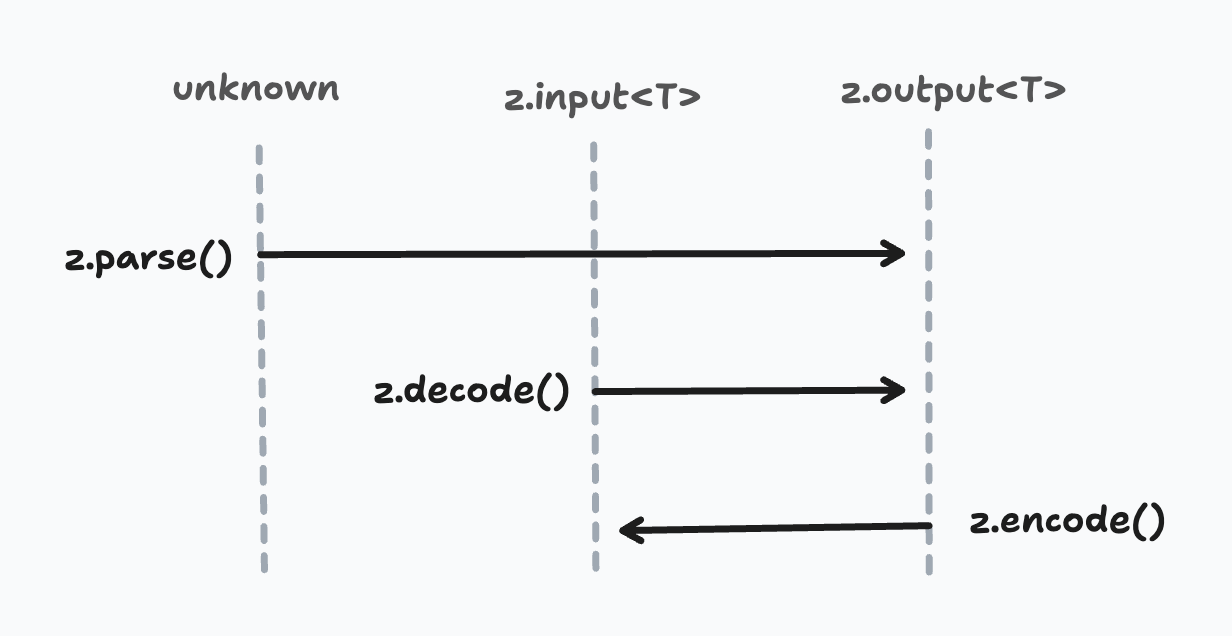
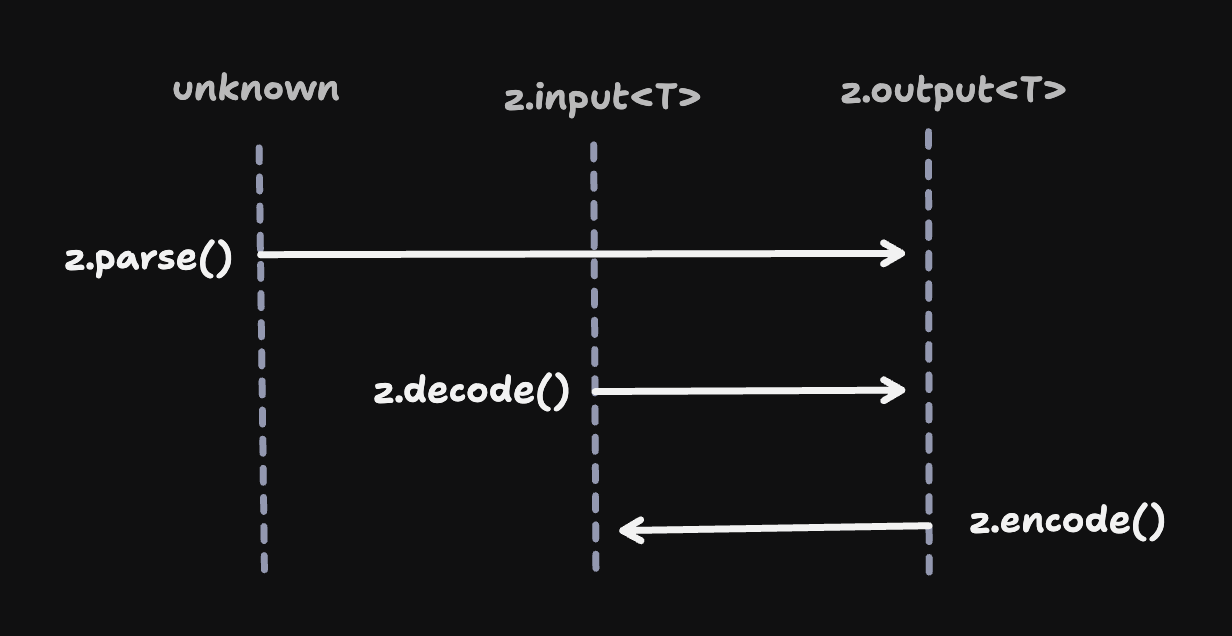
所有 Zod 模式(schema)都支持正向和反向两种输入处理方式:

  • 正向InputOutput
    • .parse()
    • .decode()
  • 反向OutputInput
    • .encode()

在大多数情况下,这种区分没有区别。输入类型和输出类型是相同的,所以“正向”和“反向”没有差异。

const schema = z.string();
 
type Input = z.input<typeof schema>;    // string
type Output = z.output<typeof schema>;  // string
 
schema.parse("asdf");   // => "asdf"
schema.decode("asdf");  // => "asdf"
schema.encode("asdf");  // => "asdf"

然而,某些模式类型会导致输入类型和输出类型不一致,尤其是 z.codec()。编码器是一种特殊的模式(schema),定义了两个其他模式之间的双向转换

const stringToDate = z.codec(
  z.iso.datetime(),  // 输入模式:ISO 日期字符串
  z.date(),          // 输出模式:Date 对象
  {
    decode: (isoString) => new Date(isoString), // ISO 字符串 → Date
    encode: (date) => date.toISOString(),       // Date → ISO 字符串
  }
);

在这些情况下,z.decode()z.encode() 的行为截然不同。

stringToDate.decode("2024-01-15T10:30:00.000Z")
// => Date
 
stringToDate.encode(new Date("2024-01-15T10:30:00.000Z"))
// => string

注意 — 这里的“方向”和术语没有特别含义。使用 A -> B 编解码器进行编码,也可以用 B -> A 编解码器进行解码。这里的“decode”和“encode”只是约定俗成的用语。

这对在网络边界处理数据特别有用。你可以在客户端和服务器间共享单个 Zod 模式,并用它在网络友好格式(如 JSON)和 JavaScript 丰富数据表示之间做转换。

代码器在网络边界进行编码和解码数据

组合性

注意 — 你可以对任何模式使用 z.encode()z.decode(),不必非得是 ZodCodec。

编解码器和普通模式一样。它们可以嵌套在对象、数组、管道等结构中,使用没有任何限制!

const payloadSchema = z.object({ 
  startDate: stringToDate 
});
 
payloadSchema.decode({
  startDate: "2024-01-15T10:30:00.000Z"
}); // => { startDate: Date }

类型安全的输入

.parse().decode()运行时行为一致,但它们的类型签名不同。.parse() 方法接受 unknown 类型输入,返回符合模式推断的输出类型的值。相比之下,z.decode()z.encode() 函数的输入是强类型的。

stringToDate.parse(12345); 
// TypeScript 无提示(但运行时会失败)
 
stringToDate.decode(12345); 
// ❌ TypeScript 错误:参数类型 'number' 不能赋值给类型 'string'。
 
stringToDate.encode(12345); 
// ❌ TypeScript 错误:参数类型 'number' 不能赋值给类型 'Date'。

为什么有区别?编码和解码意味着转换。在很多场景中,这些方法的输入在应用代码里已经是强类型,因此 z.decodez.encode 接受强类型输入以便在编译时发现错误。 下面的示意图展示了 parse()decode()encode() 的类型签名差异。

编码器方向示意图,展示输入和输出模式之间的双向转换

异步和安全版本

.transform().refine() 一样,编解码器支持异步转换。

const asyncCodec = z.codec(z.string(), z.number(), {
  decode: async (str) => Number(str),
  encode: async (num) => num.toString(),
});

和普通的 parse() 一样,decode()encode() 有“安全”及异步版本。

stringToDate.decode("2024-01-15T10:30:00.000Z"); 
// => Date
 
stringToDate.decodeAsync("2024-01-15T10:30:00.000Z"); 
// => Promise<Date>
 
stringToDate.safeDecode("2024-01-15T10:30:00.000Z"); 
// => { success: true, data: Date } | { success: false, error: ZodError }
 
stringToDate.safeDecodeAsync("2024-01-15T10:30:00.000Z"); 
// => Promise<{ success: true, data: Date } | { success: false, error: ZodError }>

编码机制详解

某些 Zod 模式“反转”其解析行为存在细微差别。

编解码器(Codecs)

这个比较直观。编解码器封装了两个类型之间的双向转换。z.decode() 会触发 decode 转换,将输入转换为解析后的值,而 z.encode() 则触发 encode 转换,序列化回去。

const stringToDate = z.codec(
  z.iso.datetime(),  // 输入模式:ISO 日期字符串
  z.date(),          // 输出模式:Date 对象
  {
    decode: (isoString) => new Date(isoString), // ISO 字符串 → Date
    encode: (date) => date.toISOString(),       // Date → ISO 字符串
  }
);
 
stringToDate.decode("2024-01-15T10:30:00.000Z"); 
// => Date
 
stringToDate.encode(new Date("2024-01-15")); 
// => string

管道(Pipes)

趣闻 — 编解码器实际上是内部基于管道(pipe)的子类,并添加了“中间”转换逻辑。

在普通解码时,ZodPipe<A, B> 模式先用 A 解析数据,再传给 B。编码时,数据先用 B 编码,再传回 A

约束(Refinements)

所有验证检查(.refine().min().max() 等)在两种方向都会执行。

const schema = stringToDate.refine((date) => date.getFullYear() >= 2000, "必须是本千年");
 
schema.encode(new Date("2000-01-01"));
// => Date
 
schema.encode(new Date("1999-01-01"));
// => ❌ ZodError: [
//   {
//     "code": "custom",
//     "path": [],
//     "message": "必须是本千年"
//   }
// ]

为了避免自定义 .refine() 逻辑在 z.encode() 中抛出意外错误,Zod 会进行两遍“检测”。第一遍确保输入符合期望类型(避免出现 invalid_type),通过后才会进行第二遍执行约束逻辑。

这种设计也支持“变异转换”(mutating transforms),比如 z.string().trim()z.string().toLowerCase()

const schema = z.string().trim();
 
schema.decode("  hello  ");
// => "hello"
 
schema.encode("  hello  ");
// => "hello"

默认值和前置默认值

默认值和前置默认值仅应用于“正向”方向。

const stringWithDefault = z.string().default("hello");
 
stringWithDefault.decode(undefined); 
// => "hello"
 
stringWithDefault.encode(undefined); 
// => ZodError: 预期 string,收到 undefined

当你给模式附加默认值时,输入变成可选(| undefined),但输出不变。因此,undefined 不是 z.encode() 的有效输入,默认值不会生效。

捕获(Catch)

同样地,.catch() 仅在“正向”方向生效。

const stringWithCatch = z.string().catch("hello");
 
stringWithCatch.decode(1234); 
// => "hello"
 
stringWithCatch.encode(1234); 
// => ZodError: 预期 string,收到 number

Stringbool

注意Stringbool 早于 Zod 引入编解码器。现在它内部已重写为编解码器实现。

z.stringbool() API 将字符串值(如 "true""false""yes""no" 等)转换成 boolean。默认情况下,z.encode() 会将 true 转成 "true",将 false 转成 "false"

const stringbool = z.stringbool();
 
stringbool.decode("true");  // => true
stringbool.decode("false"); // => false
 
stringbool.encode(true);    // => "true"
stringbool.encode(false);   // => "false"

如果你指定了自定义的 truthyfalsy 数组,则数组的第一个元素会被用作编码结果。

const stringbool = z.stringbool({ truthy: ["yes", "y"], falsy: ["no", "n"] });
 
stringbool.encode(true);    // => "yes"
stringbool.encode(false);   // => "no"

转换(Transforms)

⚠️ — .transform() API 实现的是单向转换。如果你的某个模式包含 .transform(),调用 z.encode() 会发生运行时错误(非 ZodError)。

const schema = z.string().transform(val => val.length);
 
schema.encode(1234); 
// ❌ Error: 编码时遇到单向转换: ZodTransform

有用的编解码器

下面是常用编解码器的实现示例。为便于定制,这些并未作为 Zod 的一等 API 直接提供。你应复制粘贴进项目中,根据需要修改。

注意 — 所有下列编解码器实现均经过正确性测试。

stringToNumber

使用 parseFloat() 将数字字符串转换为 JavaScript number 类型。

const stringToNumber = z.codec(z.string().regex(z.regexes.number), z.number(), {
  decode: (str) => Number.parseFloat(str),
  encode: (num) => num.toString(),
});
 
stringToNumber.decode("42.5");  // => 42.5
stringToNumber.encode(42.5);    // => "42.5"

stringToInt

使用 parseInt() 将整数字符串转换为 JavaScript 的 number 类型。

const stringToInt = z.codec(z.string().regex(z.regexes.integer), z.int(), {
  decode: (str) => Number.parseInt(str, 10),
  encode: (num) => num.toString(),
});
 
stringToInt.decode("42");  // => 42
stringToInt.encode(42);    // => "42"

stringToBigInt

将字符串转换为 JavaScript 的 bigint 类型。

const stringToBigInt = z.codec(z.string(), z.bigint(), {
  decode: (str) => BigInt(str),
  encode: (bigint) => bigint.toString(),
});
 
stringToBigInt.decode("12345");  // => 12345n
stringToBigInt.encode(12345n);   // => "12345"

numberToBigInt

将 JavaScript 的 number 转换为 bigint 类型。

const numberToBigInt = z.codec(z.int(), z.bigint(), {
  decode: (num) => BigInt(num),
  encode: (bigint) => Number(bigint),
});
 
numberToBigInt.decode(42);   // => 42n
numberToBigInt.encode(42n);  // => 42

isoDatetimeToDate

将 ISO 日期时间字符串转换为 JavaScript Date 对象。

const isoDatetimeToDate = z.codec(z.iso.datetime(), z.date(), {
  decode: (isoString) => new Date(isoString),
  encode: (date) => date.toISOString(),
});
 
isoDatetimeToDate.decode("2024-01-15T10:30:00.000Z");  // => Date 对象
isoDatetimeToDate.encode(new Date("2024-01-15"));       // => "2024-01-15T00:00:00.000Z"

epochSecondsToDate

将 Unix 时间戳(秒)转换为 JavaScript Date 对象。

const epochSecondsToDate = z.codec(z.int().min(0), z.date(), {
  decode: (seconds) => new Date(seconds * 1000),
  encode: (date) => Math.floor(date.getTime() / 1000),
});
 
epochSecondsToDate.decode(1705314600);  // => Date 对象
epochSecondsToDate.encode(new Date());  // => Unix 秒时间戳

epochMillisToDate

将 Unix 时间戳(毫秒)转换为 JavaScript Date 对象。

const epochMillisToDate = z.codec(z.int().min(0), z.date(), {
  decode: (millis) => new Date(millis),
  encode: (date) => date.getTime(),
});
 
epochMillisToDate.decode(1705314600000);  // => Date 对象
epochMillisToDate.encode(new Date());     // => Unix 毫秒时间戳

json(schema)

将 JSON 字符串解析为结构化数据,并序列化回 JSON。该泛型函数接受一个输出模式用于验证解析后的 JSON。

const jsonCodec = <T extends z.core.$ZodType>(schema: T) =>
  z.codec(z.string(), schema, {
    decode: (jsonString, ctx) => {
      try {
        return JSON.parse(jsonString);
      } catch (err: any) {
        ctx.issues.push({
          code: "invalid_format",
          format: "json",
          input: jsonString,
          message: err.message,
        });
        return z.NEVER;
      }
    },
    encode: (value) => JSON.stringify(value),
  });

使用示例:

const jsonToObject = jsonCodec(z.object({ name: z.string(), age: z.number() }));
 
jsonToObject.decode('{"name":"Alice","age":30}');  
// => { name: "Alice", age: 30 }
 
jsonToObject.encode({ name: "Bob", age: 25 });     
// => '{"name":"Bob","age":25}'
 
jsonToObject.decode('~~invalid~~'); 
// ZodError: [
//   {
//     "code": "invalid_format",
//     "format": "json",
//     "path": [],
//     "message": "Unexpected token '~', \"~~invalid~~\" is not valid JSON"
//   }
// ]

utf8ToBytes

将 UTF-8 字符串转换为 Uint8Array 字节数组。

const utf8ToBytes = z.codec(z.string(), z.instanceof(Uint8Array), {
  decode: (str) => new TextEncoder().encode(str),
  encode: (bytes) => new TextDecoder().decode(bytes),
});
 
utf8ToBytes.decode("Hello, 世界!");  // => Uint8Array
utf8ToBytes.encode(bytes);          // => "Hello, 世界!"

bytesToUtf8

Uint8Array 字节数组转换为 UTF-8 字符串。

const bytesToUtf8 = z.codec(z.instanceof(Uint8Array), z.string(), {
  decode: (bytes) => new TextDecoder().decode(bytes),
  encode: (str) => new TextEncoder().encode(str),
});
 
bytesToUtf8.decode(bytes);          // => "Hello, 世界!"
bytesToUtf8.encode("Hello, 世界!");  // => Uint8Array

base64ToBytes

将 Base64 字符串转换为 Uint8Array 字节数组,反之亦然。

const base64ToBytes = z.codec(z.base64(), z.instanceof(Uint8Array), {
  decode: (base64String) => z.util.base64ToUint8Array(base64String),
  encode: (bytes) => z.util.uint8ArrayToBase64(bytes),
});
 
base64ToBytes.decode("SGVsbG8=");  // => Uint8Array([72, 101, 108, 108, 111])
base64ToBytes.encode(bytes);       // => "SGVsbG8="

base64urlToBytes

将 Base64url 字符串(URL安全的 Base64)转换为 Uint8Array 字节数组。

const base64urlToBytes = z.codec(z.base64url(), z.instanceof(Uint8Array), {
  decode: (base64urlString) => z.util.base64urlToUint8Array(base64urlString),
  encode: (bytes) => z.util.uint8ArrayToBase64url(bytes),
});
 
base64urlToBytes.decode("SGVsbG8");  // => Uint8Array([72, 101, 108, 108, 111])
base64urlToBytes.encode(bytes);      // => "SGVsbG8"

hexToBytes

将十六进制字符串转换为 Uint8Array 字节数组,反之亦然。

const hexToBytes = z.codec(z.hex(), z.instanceof(Uint8Array), {
  decode: (hexString) => z.util.hexToUint8Array(hexString),
  encode: (bytes) => z.util.uint8ArrayToHex(bytes),
});
 
hexToBytes.decode("48656c6c6f");     // => Uint8Array([72, 101, 108, 108, 111])
hexToBytes.encode(bytes);            // => "48656c6c6f"

stringToURL

将 URL 字符串转换为 JavaScript URL 对象。

const stringToURL = z.codec(z.url(), z.instanceof(URL), {
  decode: (urlString) => new URL(urlString),
  encode: (url) => url.href,
});
 
stringToURL.decode("https://example.com/path");  // => URL 对象
stringToURL.encode(new URL("https://example.com"));  // => "https://example.com/"

stringToHttpURL

将 HTTP/HTTPS URL 字符串转换为 JavaScript URL 对象。

const stringToHttpURL = z.codec(z.httpUrl(), z.instanceof(URL), {
  decode: (urlString) => new URL(urlString),
  encode: (url) => url.href,
});
 
stringToHttpURL.decode("https://api.example.com/v1");  // => URL 对象
stringToHttpURL.encode(url);                           // => "https://api.example.com/v1"

uriComponent

使用 encodeURIComponent()decodeURIComponent() 编码和解码 URI 组件。

const uriComponent = z.codec(z.string(), z.string(), {
  decode: (encodedString) => decodeURIComponent(encodedString),
  encode: (decodedString) => encodeURIComponent(decodedString),
});
 
uriComponent.decode("Hello%20World%21");  // => "Hello World!"
uriComponent.encode("Hello World!");      // => "Hello%20World!"